What you actually have to do on day one.
No consultant. No data migration team. No six-week configuration project. Here's the entire setup, honestly described, and what the software actually does once you're in it.
Sign up, not onboard
Most nonprofit software vendors want a call before you can see the product. We don't. You sign up with your organization's name, your email, and a password, and you're inside Flockwell in under a minute — no sales call, no "let us understand your workflow first" discovery session, no contract to sign before you've even seen the thing.
If you'd rather talk to a real person before you commit any time to it, that's fine too — reach out and we'll walk you through it directly. But nothing about Flockwell requires that conversation to happen first. The product has to earn your time on its own, not through a sales process.
Everything lives in one place
The single biggest thing that's broken about running a small nonprofit's operations today isn't any one piece of software — it's that donor data lives in one tool, program and case data lives in a spreadsheet or a second tool, grant and finance data lives in QuickBooks or another spreadsheet, and none of them know about each other. Answering a question that spans two of those systems means exporting from one, exporting from the other, and reconciling them by hand, usually in a third spreadsheet built just for that one report.
Flockwell replaces that with thirteen record types in one database, joined by the same program, grant, and fund IDs, so a question that spans donor data and program data and finance data is just one query against one system instead of three exports and a afternoon of VLOOKUP.
Fundraising & people
- Donors — contact info, notes, giving history
- Gifts — amount, date, which program it supported, acknowledgment status
- Volunteers & volunteer hours — who gives time, to which program, how much
Programs & service delivery
- Programs — what you run
- Participants — who you serve, intake to exit
- Case notes — tied to the real participant record, not a side document
Grants & finance
- Grants — funder, amount, status, report due dates
- Funds — restricted vs. unrestricted
- Transactions — every inflow and outflow against a fund, program, or grant
Compliance & recruitment
- Compliance items — funder reports, renewals, any dated obligation
- Recruitment needs — open volunteer, fundraiser, or tutor needs with a deadline
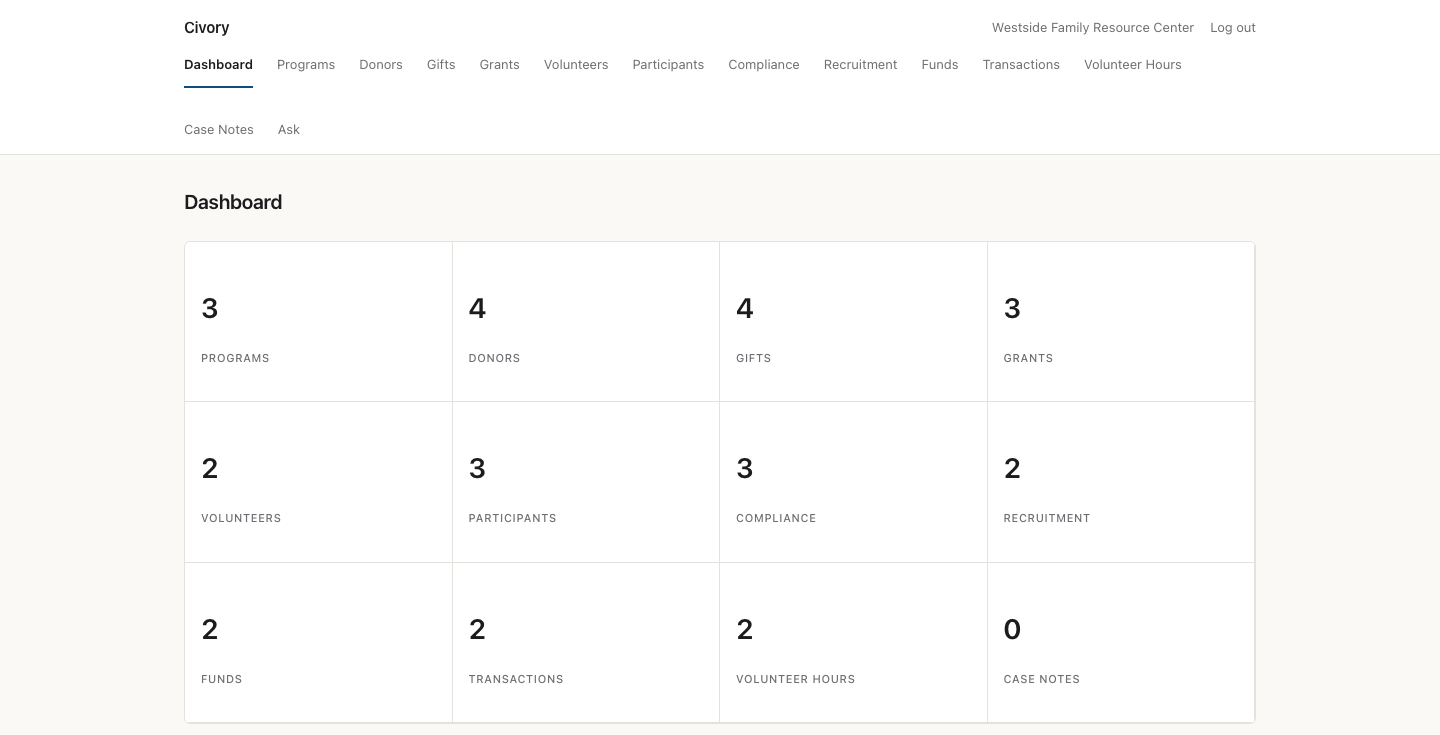
One dashboard, every record type.
This is the actual Flockwell dashboard — not a mockup. Thirteen record types, one screen, no exports required to see the shape of your organization's work.
Ask instead of building a report
Once your data is in Flockwell, you don't need to know how to build a report to get an answer out of it. You type the question the way you'd ask a colleague — "how much have we raised from grants this year," "which gifts haven't been acknowledged yet," "what's due in the next 30 days" — and Flockwell answers directly from your organization's own records. If the data doesn't actually contain enough to answer confidently, it says so plainly instead of guessing, because a wrong number here is a real mistake, not just an awkward sentence.
AI drafts with a human in the loop, always
Flockwell drafts two kinds of documents directly from your data: funder progress report narratives (pulled from a grant's linked transactions, compliance items, and program) and donor thank-you letters (pulled from the actual gift record). Both exist to save you the blank-page problem, not to replace your judgment.
Every single draft — no exceptions — is shown behind a visible "Draft only, review before sending" banner, and nothing is ever transmitted to a funder or a donor automatically. This isn't a legal disclaimer we bolted on afterward; it's a real constraint on how the feature was built, for a reason specific to this sector: funders are increasingly running AI-detection on submitted applications and reports, and a small nonprofit cannot afford the compliance risk of an AI-written document going out the door unreviewed. We'd rather you read it first every time than save you thirty seconds and put your funder relationship at risk.
What incumbent software makes you do instead
Here's the honest comparison, sourced from public pricing and real user reviews, not from us:
That first number isn't a yearly license — it's what you pay a consultant before you've entered a single donor record. Flockwell doesn't have an implementation phase because it doesn't have an implementation-shaped problem: there's no custom configuration project to hire someone for.
See your own data in minutes.
Sign up, enter your first few donors, programs, or grants, and ask it a question. That's the whole evaluation.
Sign up